Karaoke Maker - Turn Any Song into Karaoke
Make a karaoke video in your browser when you want a finished file people can actually sing from. Upload a song, add accurate lyrics, let Youka create the first vocal-free draft, then preview the result, fix timing or text, choose the look, and export an MP4.
Start free with 15 credits. Use them to test a real song and inspect the vocal removal, lyric timing, editing controls, and exported video before buying more credits.
Make karaoke with Youka Online
See the Karaoke Output
This frame comes from a Youka karaoke video made with an approved royalty-free sample track. It shows the result this workflow is built for: readable synced lyrics, a finished background, and a video you can play or share.
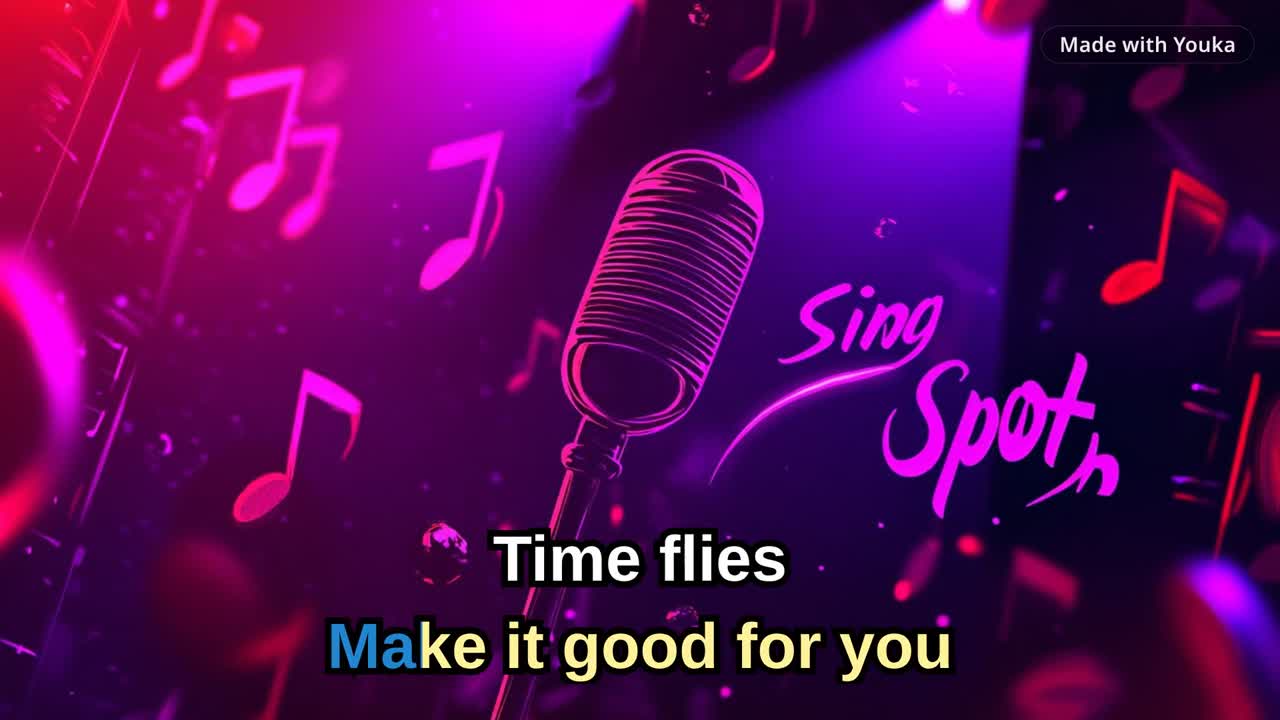
Demo music: Good For You by THBD, from Audio Library. Source: YouTube.
Quick Answer
A karaoke maker turns a song and its lyrics into a sing-along video. With Youka, you upload an audio or video file, add or find lyrics, let AI separate the lead vocal and align the words, preview and edit the draft, customize the visuals, and export the result as an MP4 in up to 4K.
If you already have an audio file, see MP3 to Karaoke. For a video-first workflow, use Karaoke Video Maker. To start from a public video URL, use YouTube to Karaoke with Youka Online and the Youka Extension.
How to Make Karaoke with Youka
1. Choose a Clean Source
Upload the best version of the song you have. Common audio and video files work in the browser, including MP3, WAV, FLAC, M4A, MP4, MOV, MKV, AVI, and WebM.
Clean studio audio usually gives AI more useful information than a phone recording, low-bitrate file, live performance, or track with crowd noise. If the first separation sounds rough, try another source before spending time on detailed lyric edits.
2. Add Accurate Lyrics
Paste your lyrics or let Youka find them when available. Clean lyrics produce a better first draft: remove timestamps, page headers, credits, and "repeat chorus" notes, and include repeated sections in full.
3. Let AI Build the First Draft
Youka processes the song in the cloud to separate the lead vocal, align the lyrics, and create a playable karaoke draft. Processing time and separation quality depend on the length and complexity of the source recording.
4. Preview and Fix the Result
Check the draft like a singer before exporting:
- Are all lyrics present and in the right order?
- Do words appear early enough to sing comfortably?
- Are long lines split into readable phrases?
- Is the remaining vocal level acceptable for this source?
- Can you read the text from the intended screen distance?
Edit lyric text, timing, line breaks, position, colors, font size, and background without recreating the project from scratch.
5. Style and Export the Video
Choose a solid color, image, video, or original-video background. Add readable lyric colors, outline or shadow, a logo, and intro or outro media where useful. Then export the finished karaoke video as an MP4 in up to 4K.
For TVs, classrooms, parties, or event screens, prioritize large high-contrast lyrics over decorative effects. Use the karaoke video export settings checklist before exporting a batch.
What You Can Make
- Karaoke videos with synced lyrics and an instrumental backing track
- Lyric videos that keep the original vocal in the mix
- Practice tracks with editable timing and readable lyric layouts
- Duet-style videos with different singer colors
- Branded videos with your own background, colors, logo, intro, or outro
Free to Start
New accounts get 15 free credits. Test one real song and judge the parts that matter for your use case: vocal-removal quality, lyric sync, editability, and the exported MP4.
Buy more credits only after the first export proves the workflow is a fit. For current plan details, see Free Karaoke Maker or compare the pricing options.
Choose the Right Karaoke Workflow
| What you have or need | Best starting point |
|---|---|
| An MP3 or other audio file | MP3 to Karaoke |
| A finished sing-along MP4 | Karaoke Video Maker |
| The lowest-friction web start | Online Karaoke Maker |
| A public video URL | YouTube to Karaoke + Extension |
| Synced lyrics with vocals kept | Lyrics Video Maker |
Common Problems and Fixes
The lead vocal is still audible
Try a cleaner source. AI separation is harder when vocals are buried under reverb, doubles, distortion, instruments in the same frequency range, or crowd noise. Some recordings will retain artifacts even with a strong model.
The lyrics are early, late, or incomplete
First confirm the lyric text matches the exact song version and includes every repeated section. Then adjust words or lines in the timing editor.
The text is hard to read
Increase the font size, shorten long lines, add an outline or shadow, use stronger contrast, and simplify the background.
I only have a public video URL
Use YouTube to Karaoke with Youka Online and the Youka Extension. The extension adds the URL-based creation path in the browser.
Can I edit the project after AI creates it?
Yes. You can correct lyrics, adjust timing and line breaks, change the visual style, preview the result, and export again from the project.
Ready to test a real song? Start with Youka Online.