
Instrumental Maker for Backing Tracks and Karaoke
Turn a song into an instrumental backing track in your browser. Upload an audio or video file, let Youka create the first vocal-separated draft, then preview the result before you use it for practice, a cover, teaching, a performance, or a finished karaoke video.
Source quality and the original mix affect the result. Clean studio recordings usually separate more clearly than live recordings, layered vocals, heavy reverb, or low-quality files. Youka gives you a fast first draft to inspect—not a promise that every vocal layer will disappear without artifacts.
New accounts receive 15 free credits. Use them to test one real source and decide whether the instrumental is useful before processing a larger set.
Start from Your Own Song
Begin with the cleanest source you have. Youka Online accepts common audio and video formats and keeps the resulting instrumental inside the same project workflow used for preview, lyric timing, visual editing, and export.
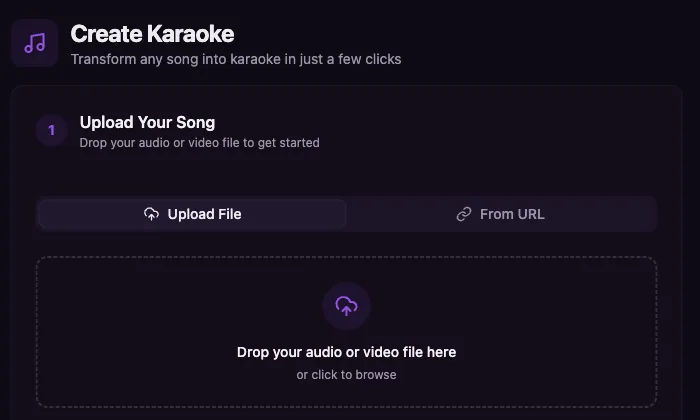
The screenshot shows the real browser starting point. It demonstrates how to begin a project; it does not guarantee the separation quality of a particular recording.
How to Make an Instrumental
1. Upload the Source
Start with MP3, WAV, FLAC, M4A, MP4, MOV, or another supported media file. Clean, high-quality sources usually give the separation model more useful detail than compressed clips, live recordings, or recordings with crowd noise.
If the song is easiest to start from a public video page, use Youka Online with the Youka Extension. You remain responsible for the rights to the source and resulting use.
2. Create the First Separated Draft
Youka processes the source and prepares an instrumental draft with the lead vocal reduced or removed. The exact result depends on how the vocal, backing vocals, harmonies, effects, and instruments are mixed in the recording.
Treat this as the first version to review. A dense mix may leave vocal bleed or remove musical detail that overlaps the vocal frequencies.
3. Preview the Result
Listen for the details that matter to your job:
- whether the lead vocal is reduced enough;
- whether backing vocals or harmonies remain in a useful way;
- whether drums, bass, and important instruments still sound clear;
- whether reverb, crowd noise, or compression creates artifacts;
- whether the source is the exact version you intended to use.
If the result is not useful, try a cleaner source before spending credits on a larger batch.
4. Continue to the Finished Output
Use the instrumental as a backing track for practice, a cover, teaching, or performance. If you need a finished video, continue in the same project to add or fix lyrics, choose a background, preview playback, and export a karaoke MP4.
For a file-specific karaoke workflow, use MP3 to Karaoke. For a public video source, use YouTube to Karaoke with the Extension.
Who Uses an Instrumental Maker?
Singers and Performers
Create a practice or performance backing track from the exact recording you need. Preview the separation before rehearsing or building a set around it.
Karaoke Hosts and DJs
Handle custom song requests when a ready-made instrumental is unavailable. Test one request first, then repeat the workflow only when the output is suitable.
Teachers and Coaches
Prepare practice material that lets students hear the arrangement without competing with the main vocal. Source quality still determines how cleanly the parts separate.
Video and Karaoke Creators
Use the instrumental as the audio foundation for a synced lyric video, practice video, or custom karaoke MP4 instead of rebuilding the project in several tools.
What Affects Instrumental Quality?
AI separation works from the audio information already present in the source. Results vary because vocals and instruments often share frequencies and effects.
Expect more cleanup risk with:
- live recordings and crowd noise;
- heavy reverb or delay on the vocal;
- layered lead vocals, harmonies, and choir sections;
- distorted or low-bitrate sources;
- remixes, edits, and recordings where the vocal is blended deeply into the music.
Youka does not replace an official studio instrumental. The useful question is whether the preview is clean enough for your practice, performance, teaching, cover, or karaoke-video job.
Free Trial and Repeat Use
Use the 15 free credits on one real song to check vocal reduction, instrumental detail, and source fit. This is a free trial, not unlimited free processing or exports.
Paid credits make sense after the first result proves useful—especially for repeat requests, lesson libraries, performance sets, cover projects, or batches of karaoke videos. Testing first helps avoid spending credits on sources that are unlikely to separate well.
Choose the Right Workflow
| Your goal | Best page | Why |
|---|---|---|
| Create an instrumental backing track | Instrumental Maker | Start from a source song and inspect the separated draft |
| Focus only on vocal removal | Remove Vocals Online | Direct vocal-removal workflow and quality guidance |
| Turn an MP3 into a karaoke video | MP3 to Karaoke | File-based instrumental, lyrics, styling, and MP4 output |
| Start from a public video URL | YouTube to Karaoke | Uses Youka Online with the Youka Extension |
| Export a finished synced video | Karaoke Video Maker | Instrumental plus editable lyrics and visual output |
| Use URL creation, free export, or offline playback | Youka Desktop | Installed Online workflow with Desktop benefits |
Rights and Source Responsibility
You can process and export your Youka project, but you are responsible for the rights to the song, recording, lyrics, video, images, and resulting use. Vocal removal does not make copyrighted source material royalty-free.
Ready to test a real source? Create an instrumental with Youka Online, preview the separated draft, and continue only if the result fits your project.