Youka vs MyKaraoke Video
MyKaraoke Video positions itself against Youka on price, browser creation, lyric syncing, visual customization, and editor control. Those are fair things to compare, but they are not the whole decision.
If you are choosing a karaoke maker, do not compare only the headline subscription price or a feature checklist. Compare the full workflow: how you start a project, how much control you have when the first AI result is not perfect, how exports work, and whether the finished karaoke stays useful after you create it.
For most creators who want a reusable karaoke workflow, the safer first test is Youka Online. You can start in the browser, create from files or video URLs, choose from multiple AI model paths, refine timing and style, export more than one version, and keep finished karaoke in a library you can stream from other devices.
Short Answer
MyKaraoke Video's own pages make a clear case around low headline pricing, browser upload, AI lyric sync, visual customization, preview, and 1080p MP4 export. If those claims caught your attention, use them as a checklist.
Then check what happens in the real production workflow:
- Can you create from a video URL, or only from uploaded files?
- Can you choose another AI model path when a song needs a different result?
- Can you re-sync and re-export without turning every revision into a cost decision?
- Can you keep the karaoke in a library, stream it from another device, and use a phone as a remote?
- Can you inspect the actual product before committing to a larger batch?
That is where Youka is built to win. Start with Youka Online, create one rights-safe test song, and judge the workflow from the output you actually get.
At a Glance
| Question | Youka | MyKaraoke Video |
|---|---|---|
| Can I start in the browser? | Yes, with Youka Online | Yes, browser-first public positioning |
| Can I create from a URL? | Yes, in the web app with the Youka Extension | Not the main public positioning checked |
| Can I upload audio or video? | Yes | Yes |
| Can I choose the AI path? | Yes, with multiple model choices including AudioShake and MusicAI paths | Public pages describe built-in AI processing |
| Can I edit lyric timing? | Yes, with editable timing, style controls, and preview | Yes, with automatic sync and a manual sync editor |
| What export path is offered? | Cloud export plus free local exports on supported systems through the Youka Extension | Public pages describe queue and instant export rules |
| Extra music tools | Chord layouts are available through Song Chords | Not found in checked public pages |
| Does it become a library? | Yes, save karaoke, stream from different devices, and use a phone as a remote | Public pages focus on creating and exporting videos |
| Best evaluation path | Test one real song in Youka Online and inspect the whole workflow | Compare the advertised browser upload and export model carefully |
The Claims To Check
MyKaraoke Video's blog post frames MyKaraoke as cheaper, more feature-rich, stronger for lyric sync, stronger for manual timing, and stronger for visual customization than Youka. That is useful because it shows the exact questions a serious buyer should test.
Price
MyKaraoke Video's public pricing, checked May 15, 2026, lists Standard at $7.99/month and Premium at $14.99/month. Its public credit examples list a 3-minute karaoke video at 6 credits, queue exports as free for subscribers, and instant export as an extra-credit path.
Youka's current pricing page starts at $9.99/month and describes about 5 credits per song. That means the headline subscription price is not the full comparison. The useful pricing question is:
What does it cost to get from song input to the final version you actually use?
For karaoke creators, revisions matter. You may fix timing, test layouts, try a different background, prepare a clean TV version, or export a second version for a class, rehearsal, channel, or event. Youka's case is workflow value: URL starts, model choice, manual re-sync without extra credits after creation, free local exports on supported systems through the Youka Extension, and library playback.
Lyric Sync
Both products advertise AI lyric sync. The first AI sync is only part of the job.
The real question is what you can do when a song is messy: fast phrasing, repeated lyrics, a live recording, missing lines, or a timing mismatch. Youka gives you editable timing, preview, and model choice so you are not locked into one result.
If sync quality is your biggest concern, test Youka with one rights-safe song before comparing plans. Use the same lyrics, same source, and same export goal.
Editor Control And Visuals
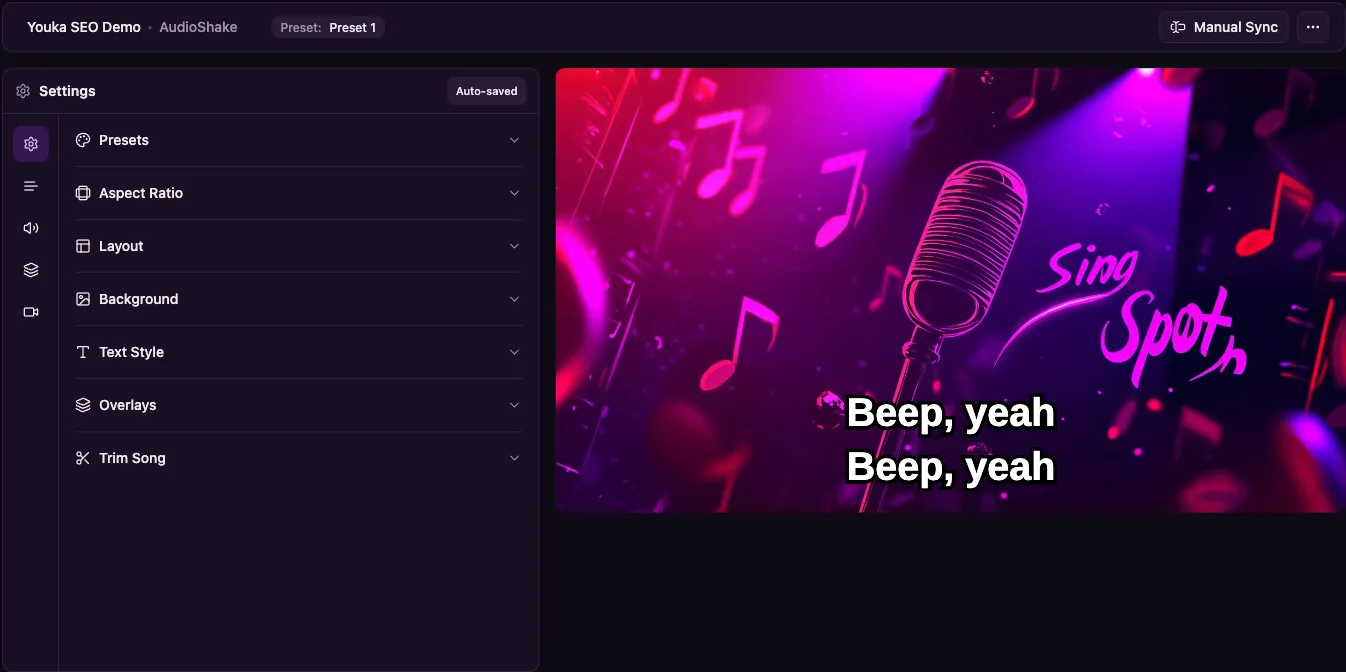
MyKaraoke Video emphasizes fonts, colors, backgrounds, animation, preview, and manual sync editing. Youka also gives you styling, layout, background, duet, timing, preview, and export controls in the studio.
For a creator, the better question is not "which tool has more controls on a list?" It is:
Can I get the video to a clean, readable, usable result without fighting the tool?
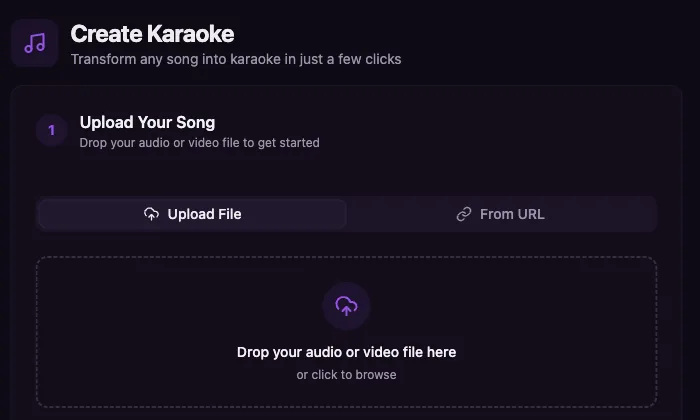
The screenshots on this page show the actual Youka create form and studio editor so you can inspect the workflow instead of relying only on claims.
Where Youka Is Stronger
Youka is the stronger fit when the karaoke project does not end after one upload and one export.
- Start from files or video URLs. Use Youka Online for file creation, and add the Youka Extension when your web workflow needs supported URL creation.
- Choose the AI model path. Some songs need a different separation or sync approach. Youka gives you multiple model paths, including AudioShake and MusicAI options.
- Iterate without turning every export into the main decision. With the Youka Extension on supported systems, local exports are free. That matters when you test layouts, fix sync, or prepare several versions.
- Keep a usable karaoke library. Youka stores created karaoke so you can stream it from different devices and use your phone as a remote.
- Inspect the real product. The screenshots on this page show the current Youka Online create form and studio editor.
Youka also includes Song Chords, which helps practice, teaching, and musician workflows. For most karaoke creators, the bigger reason to test Youka is the production flow: source flexibility, model choice, re-exporting, and a library you can use after the video is made.
Pricing And Credits: Ask Better Questions
MyKaraoke Video's public pages make price part of its positioning against Youka. That is expected. A cheaper headline plan can be persuasive.
Before you choose on price, compare the full workflow:
- How many complete songs does the plan cover for your real song lengths?
- What costs credits: creation, sync, export, instant export, re-export, or all of them?
- Do queue exports fit your timing, or will you pay extra for speed?
- Can you export locally for free on your system?
- Do credits reset, expire, or roll over?
- Do you need URL creation, AI model choice, repeated exports, or a karaoke library?
If the comparison stops at monthly price, it is incomplete. If your goal is a karaoke workflow you can reuse, start with Youka and measure the whole path from song to finished MP4.
Workflow Comparison
Starting A Project
Youka lets you start from a file or a video URL. In the web app, URL creation works with the Youka Extension.
MyKaraoke Video's public pages emphasize browser-based creation from uploaded music and pasted lyrics.
Vocal Removal And Lyrics Sync
Both tools advertise AI vocal removal and lyric sync. Youka's advantage is choice. If one source song needs a different separation or sync approach, you can try another model path instead of treating the first result as the only path.
Clean source audio and accurate lyrics still matter in both products. No AI karaoke maker can fully fix a noisy live recording, wrong lyrics, or a source file you do not have rights to use.
Editing And Visual Style
Youka lets you refine lyrics, timing, layout, background, fonts, colors, duet styling, preview, and export settings. The screenshot below shows the actual Youka studio editor.
MyKaraoke Video lists background customization, font and color controls, layouts, duet mode, real-time preview, and sync editing on its public pages. Treat those as evaluation criteria, then compare them against the actual Youka studio on your own song.
Export And Playback
Both tools export MP4 video. MyKaraoke Video's public pages describe 1080p MP4, queue exports, and instant exports.
Youka supports cloud export plus free local exports on supported systems through the Youka Extension. If you work from a video URL, Youka can request high source quality where the original supports it. For finished export resolution, check the selected export path before you start a production batch.
The bigger difference is what happens after export. MyKaraoke's public pages are centered on creating and exporting. Youka also gives you a karaoke library, device streaming, and mobile remote control.
See The Youka Workflow
A comparison page should show the product, not only make claims. The screenshots on this page show the current Youka Online create form and studio/editor flow.
You can also review the focused Youka workflows:
- Karaoke Video Maker for finished MP4 creation;
- Online Karaoke Maker for browser creation;
- MP3 to Karaoke for audio-file conversion;
- Lyrics Video Maker for synced lyric videos;
- Song Chords for musician and practice workflows.
Limits And Rights
Neither product gives you rights to songs you do not own. If you publish a karaoke or lyric video publicly, especially on YouTube or another monetized channel, you are responsible for the music, lyrics, source file, and visual rights.
Quality also depends on the input. Clean studio audio and accurate lyrics usually produce better vocal separation and sync than noisy live recordings, low-bitrate files, or lyric pages with missing repeated sections.
Final Recommendation
If you are comparing MyKaraoke Video and Youka, start by testing Youka with one rights-safe song. Use the web app, preview the synced lyrics, adjust timing and style, then export a short sample before committing to a larger workflow.
Choose the tool from the finished workflow, not the headline price. Youka is the stronger fit when you want URL creation in the web app, multiple AI model choices, free local exports on supported systems, a karaoke library, device streaming, mobile remote control, and a practical path from song input to edited MP4.
Ready to compare from a real project? Create your first karaoke in Youka Online, or read the focused Karaoke Video Maker workflow.
Sources Checked
- MyKaraoke Video homepage - checked May 15, 2026
- MyKaraoke Video credits guide - checked May 15, 2026
- MyKaraoke Video article that discusses Youka - checked May 15, 2026
- MyKaraoke Video Karaoke Video Creator alternative page - checked May 14, 2026
- Youka pricing - checked May 14, 2026
- Youka Extension - checked May 14, 2026
Inside Youka Online
See the workflow before you start
Click a screenshot to open Youka Online and try the same create-to-studio flow in your browser.